 Microsoft Teams serves as an expanding attack surface within corporate environments where threat actors exploit built-in group and guest invitation features to insert fraudulent messages directly into workplace communications bypassing many controls designed to block external threats.
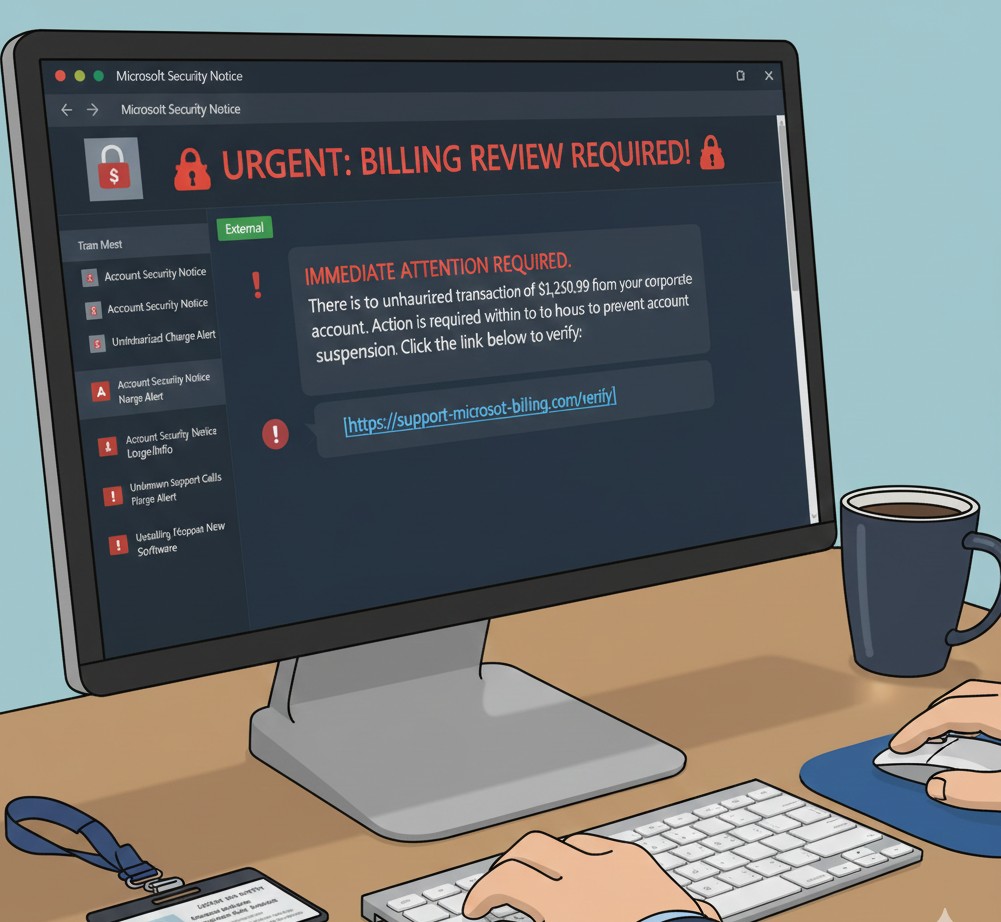
The scam typically begins with creating Microsoft Teams groups carrying urgent, authoritative names. Examples include “Unauthorised Charge Alert,” “Billing Review Required,” or “Account Security Notice.” Employees are added directly to these groups, often without prior interaction. Because the invitation comes through Microsoft infrastructure, it appears legitimate and routine.
The Mechanics of the Deception
Once a user joins the group, the message appears brief and alarming. It usually references suspicious charges, unauthorised transactions, or account irregularities requiring immediate action, details are intentionally sparse. The goal is to funnel the user into a predefined response path rather than encouraging legitimate verification.
Embedded within the message is a link directing the user to a page mimicking a support or verification portal. These pages closely resemble legitimate Microsoft or financial service websites; branding, layout, and language are carefully replicated to maintain trust. In some cases, victims are prompted to enter corporate credentials to confirm their account. Other interactions escalate into fake support processes involving phone calls or chat sessions to extract additional information. Some variants pressure victims to install remote access software under the guise of resolving the issue.
Meta and Facebook Group Exploitation
A parallel trend involves the exploitation of Meta platforms. Attackers create fraudulent Facebook groups or pages with names like "Meta Verification," "Meta Account Suspension," or "Copyright Infringement Notice." These impersonate official compliance teams targeting business owners and public figures.
The scam relies on tagging users in public posts or sending direct Messenger messages. Profiles named "Meta Support Team" or "Account Security Dept" make notifications appear official. These notifications claim a violation of community standards or that the account requires immediate verification. Users clicking the link are sent to phishing sites designed to steal login credentials and two-factor authentication codes.
Why These Tactics Bypass Defences
These scams succeed because they unfold entirely within trusted collaboration platforms. There is no unfamiliar sender, no suspicious domain at first glance, and no clear separation between internal and external communication.
Email security tools are bypassed entirely. Domain reputation checks offer limited protection when initial contact comes from legitimate Microsoft or Meta notifications. By the time a user clicks a malicious link, trust has already been transferred. This strategy exploits default workflows and behaviours embedded in workplace tools.
Primary Red Flags
Being able to recognise warning signs is essential. Key indicators include:
- Unsolicited Group Invitations: Invitations to Teams groups or being tagged by a Facebook page you do not follow, especially when names imply an emergency.
- Artificial Urgency: Phrases like "24-hour deadline" or "Final warning before deletion" are designed to provoke panic.
- Fraudulent External Links: Requests to click a link for verification that do not point to official microsoft.com or facebook.com domains and often include look-alike characters.
- Unusual Communication Channels: Meta does not use public tags or Messenger chats to notify users of policy violations. Official Microsoft alerts appear in administrative dashboards.
- Identity Discrepancies: Misspellings in group names or profiles lacking verification badges despite claiming corporate status often indicate scams.
- Requests for Credentials: Prompts for two-factor codes, passwords, or installation of remote desktop software are definitive signs of fraud.
Recommended Security Configurations for Administrators
Microsoft Teams Controls
- Restrict External Domains: Switch to an Allow List model permitting communication only with trusted partner domains.
- Disable Unmanaged User Communication: Prevent attackers using personal accounts from initiating chats.
- Manage Guest Access: Review permissions to ensure external users cannot search the directory. Disable guest invitations for non-administrative users.
- Require Multifactor Authentication (MFA): Configure MFA for all inbound users to add security barriers.
Meta Business Suite Controls
- Moderation Assist and Keyword Filtering: Hide comments containing flagged terms. Block words like "violation" or "suspension."
- Review Tagging Permissions: Restrict tagging to followers to reduce visibility of fraudulent tags.
- Verify Official Channels: Educate administrators that Meta never uses Messenger for policy violations; official warnings appear in the Account Quality dashboard.
- Establish Business Manager Hierarchy: Ensure employees use MFA and regularly audit access to remove former employees or unknown accounts.
Collaboration platforms have fundamentally changed communication and how criminals exploit trust. These tactics succeed because they operate within systems employees and business owners rely on daily. Vigilance remains the strongest defence.
Regular audits of platform settings and a culture of verification ensure fraudulent attempts fail before causing damage. Security depends on both technical safeguards and the awareness of every user. Protecting a digital presence requires proactive platform management and user education.
- Log in to post comments